Pretty Log
October 2, 2026
A big upgrade to Pretty Chat
Pretty Chat gets a big upgrade. Follow-up questions show up as chips inside the chat, search reaches beyond the page, you can highlight any text to focus the answer, and you can chat with PDFs, not just websites.
✨ New
Follow-up question chips
- Follow-up questions appear as chips right inside the chat.
- Pick one to keep the conversation going, without typing the next question yourself.
Search beyond the page
- Pretty Chat can search beyond the page you're on.
- Ask about something the current tab doesn't cover, and the answer isn't limited to that site.
Highlight to focus
- Highlight any text to focus the answer on it.
- Pretty Chat anchors its reply to that selection, so the response stays on the part you care about.
Chat with PDFs
- Chat with PDFs, not just websites.
- Open a PDF and ask about it from the side panel, the same way you already chat with a page.
- Try Pretty Chat →
September 18, 2026
Jev AI, OpenRouter, DeepSeek, and Onboarding email series
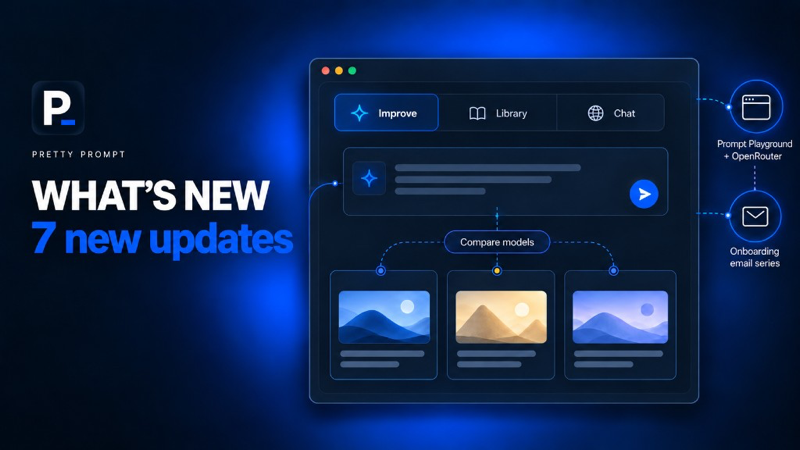
Pretty Prompt now routes prompts with Jev AI for each use case. Prompt Playground includes OpenRouter, DeepSeek works in the Chrome extension, and you can send a finished prompt straight to Compare Models to see which model works best.
✨ New
Jev AI prompt routing
- Pretty Prompt now uses Jev AI to route prompts internally, matched to the use case.
- The right improvement gets picked for the job, so you get the best output possible depending on the use case.
Onboarding email series
- New users get an onboarding email series after they sign up.
- Short emails that walk through how to use Pretty Prompt, so it's easier to get value right after you install.
OpenRouter in Prompt Playground
- Prompt Playground now includes OpenRouter.
- Test the same prompt across OpenRouter models next to the models you already compare, in one view.
- Try Prompt Playground →
DeepSeek in the Chrome extension
- DeepSeek is now supported in the Chrome extension.
- Improve prompts on DeepSeek the same way you already do on ChatGPT, Claude, and Gemini.
- Enable it once under Sites.
🎉 Improvements
Separate tabs in the extension
- The Chrome extension now has separate tabs for Improve, Library, and Chat with website.
- Switch between improving a prompt, your saved prompts, and chatting with the page without leaving the side panel.
Tab state that sticks
- The extension remembers which tab you were on.
Send to Compare Models
- Make a prompt, then send it straight to Compare Models.
- Especially useful for images: run the same prompt across models and see which one works best.
August 19, 2026
Three updates to Pretty Chat: Personas, Focus text, Slash commands
Personas helps Pretty Prompt remember your specific style, tone, and context. Also on this release, highlight and focus any text on a page, and a Slash (/) command for easy access to your saved prompts.
✨ New
Personas
- Select a saved Persona from the side panel to get answers tailored to your specific role or voice.
- Works like a memory extension, grounding the AI in your background info while it reads the page.
- Select/ click a Persona from the side panel → ask about the page → get specific answers tuned to your exact needs. You can manage your Personas in the Web App.
Highlight and Focus Text
- Highlight a specific block of text → Right-click → Focus to let Pretty Chat anchor its response to that selection.
🎉 Improvements
Slash (/) Commands
- Trigger saved prompts: pull your entire prompt library into the chat with a single command.
- Just hit "/" to browse your library, exactly like the Notion UI you already know.
- Select the prompt you need and hit enter to update the chat in place.
August 18, 2026
50,000 users and new Prompt Management Updates
We’ve rolled out 6 new updates designed to help you save, manage, and iterate on your prompts with little to no effort. From GitHub-style version control, diffs, and prompt sections, here is what’s new.
✨ New
Version Control & Diffs
- Diff View: Similar to GitHub, you can now see a clear "diff" of your changes, with explanations on what’s changed for every version of a prompt.
- Prompt Sections: Long prompts get broken down into sections so you can jump straight to a section to see what’s changed.
JSON Prompts
- You can now convert any prompt into JSON format with a single click.
- Go to the “View as” dropdown to toggle between Text and JSON views.
Attach Notes to Prompts
- Keep your library organized by adding custom notes directly to your saved prompts.
- These notes are saved as metadata and are visible in your library, making it easier to track context, usage instructions, or internal reminders about what a prompt is about.
Save Prompts from Anywhere
- Found a great prompt on X, LinkedIn, or a random website? Now you can capture it instantly.
- Highlight the text on any page, right-click, and select "Save to Prompt Library" to store it for later.
🎉 Improvements
Export by Folder
- You can now export your saved prompts on a per-folder basis.
- Go to your desired folder and select "Export as JSON" or "CSV."
Bulk Move to Folders
- Select multiple prompts at once and move them into a folder in a single action—no more one-by-one management.
- Check the boxes, click "Move," and select your destination folder.
July 13, 2026
Pretty Chat: Chat With Any Website 💬
Pretty Chat lets you chat with any website from your side panel. Like ChatGPT, but with full context of your active tab. Summarize, translate, draft replies, or ask anything about the page — no tab switching, no copy-pasting.
✨ New
Pretty Chat
- Chat with any website from your browser's side panel, with full context of the page you're on.
- Works like any AI, but grounded in your active tab, not a blank chat window.
- Open the side panel → ask about the page → get answers with full context.
- Works on articles, LinkedIn, Reddit, Gmail, and any page you're on.
- See how it works →
🎉 Improvements
Image to Prompt
- Instructions pre-prompt: guide how Pretty Prompt should reverse-engineer your image.
- Edit prompt: refine the generated prompt without starting over.
- Describe edits with chat: tell Pretty Prompt what to change in natural language and update the prompt in place.
- Try Image to Prompt →
New Agent type of prompt
- New Agent type for prompts, so you can build and save prompts tuned for agent workflows.
- Use it when your prompt is meant to drive an agent, not just a one-shot chat response.
June 30, 2026
Prompt Metadata 🏷️
You can now add metadata to your saved prompts to keep everything organized. This includes details like reference images to see exactly what a prompt produces, the final output, chat links, the active prompt version, and more.
✨ New
Prompt Metadata
- Attach a reference image to your prompts so you know the visual output at a glance.
- Set an active version from your version history to keep track of your best iterations.
- Log specific models like ChatGPT, Claude, Gemini, or any LLM you use for that specific prompt.
- Store Chat URLs, tags, and folders to keep your entire workflow searchable and structured.
- Works particularly well with Image to Prompt → generate a prompt, test it, and save the metadata for future use.
- See more here →
Public Prompt Library
- Curated Quality: Access 200+ pre-vetted prompts that have been tested for real-world effectiveness, not just hype.
- Diverse Categories: Covers a wide range of use cases including content creation, marketing strategy, and image generation.
- Plug-and-Play: Designed for immediate use—simply copy, paste, and get the specific output you need.
- Workflow Efficiency: Eliminates the guesswork and frustration of ineffective AI prompting.
- Community Driven: We are actively taking requests for new categories—let us know what you want to see next.
- Explore the library here →
June 18, 2026
Image to Prompt 🖼️
Turn any image into a ready-to-use prompt. Upload any photo, screenshot, or reference image and Pretty Prompt will reverse-engineer it into a prompt for image models. AI image prompt generator.
✨ New
Image to Prompt
- Upload any photo, screenshot, or illustration and get a structured prompt back, for image models.
- Works with UI screenshots, mood board references, illustrations, photos, etc.
- Extracts style, medium, composition, aspect ratio, and details, not just a surface-level description.
- Copy the result or use Send to and go straight to Gemini, Claude, Flux, Imagen, or your model of choice.
- Works well with Prompt Playground → generate the prompt here, then compare how different models handle it.
- See more here →
June 17, 2026
Prompt Playground ⚡
Compare AI models in one prompt. Prompt Playground sends one text or image prompt to multiple models at once. Compare Gemini, Flux, Imagen, GPT, Claude and more on a single screen, with your own API keys.
✨ New
Prompt Playground
- A place to test any prompt across multiple AI models at once, without switching tabs.
- Works with your own API keys
- Supports image generation, chat, and text completions.
- Run the same prompt through as many models as you want and compare outputs in one view.
- Pairs naturally with Image to Prompt, go from reference image to prompt to model comparison without leaving Pretty Prompt.
- See more here →
May 7, 2026
Context v2: Instructions vs. Memory 🧠
Not all context is equal. Now Pretty Prompt will treat your context and apply it differently depending if it's an Instruction (explicit rule) or a Memory (implicit context).
✨ New
Instructions vs Memory
- A smarter way to classify the context you add to Pretty Prompt. And for it to make a real difference into your AI outputs.
- Pretty Prompt now automatically classifies context as either: Instruction or Memory.
- Context is handled differently depending on its purpose.
- You can toggle "ON" any context for all your prompts, and Pretty Prompt will handle the explicit instructions, or the implicit memories automatically.
- See more here →
April 13, 2026
Dynamic prompting in the extension
Introducing Dynamic Prompts. You can now adjust specific parts of your prompt without rewriting the whole thing. Click highlighted sections, choose from the dropdown, or add your own options.
✨ New
Dynamic Prompts
- You can now adjust specific parts of your prompt without rewriting the whole thing.
- Select and modify key sections of your prompt directly.
- Fine-tune outputs faster without starting from scratch.
- Keep what works and change only what matters, making iteration more precise when small changes have a big impact on results.
🎉 Improvements
Language settings in the extension
- Language preferences are now easier to access and manage.
- Update your language settings directly from the extension popup.
- No need to switch back to the web app.
- More control, wherever you’re prompting. See video here →
March 29, 2026
Default context snippets and prompt versions
Global Context Snippets and Prompt Versions inside the extension. Track and revisit changes of your prompts + Set your Context once, automatically applied on any prompt across any AI tool.
✨ New
Global context snippets in the extension
- Turn on any context snippet to be added by default to every prompt.
- Save copy-paste and keep prompts personal to you.
Prompt Version History
- Tweaks to a prompt are saved in the prompt version history.
- Click on the version to revisit any past change. See video here →
March 28, 2026
New Extension Onboarding
New users get a short onboarding before they sign in, so it's easy to understand how to use Pretty Prompt.
✨ New
New Extension Onboarding
- New users are welcomed with onboarding before sign-in, so it's easy to understand how to use Pretty Prompt.
- The onboarding happens right inside ChatGPT so you are already where you prompt.
March 26, 2026
Pretty Chat in the Extension
Chat with your prompt right inside the extension. No credits used, no tab swapping. You can tweak your prompt as you go, and get the best output possible.
✨ New
Pretty Chat
- Chat with your prompt, right inside the extension. No credits used. No tab swapping.
- Faster: no more back-and-forth with ChatGPT or other LLMs
- More aligned: making the output exactly what you need
- The best part: it suggests specific tweaks based on your prompt.
🎉 Improvements
Tighter UI
- Made the UI tighter for a cleaner experience.
Faster Improve
- Faster improve experience.
New integrations
- Added AI Fiesta and Replit to the list of integrations. See all supported sites →
March 18, 2026
Chat With Your Prompt and Version History
This release turns Pretty Prompt into an agent that helps you build reusable prompts. Chat directly inside your prompts to iterate, refine, and tweak further. Don’t worry, every version is auto-saved ✅
✨ New
Chat With Your Prompt
- You no longer need to know how to write complex instructions. Just chat with your prompt to make tweaks. See video here →
- Ask Pretty Prompt to change any details, make it shorter, longer, divide it into blocks, or add anything needed. It even handles language translations instantly.
Version History
- Just like GitHub for code, Pretty Prompt now saves every iteration of your prompt in a version history.
- You can navigate through your prompt history, revisit previous versions, and ensure you never lose a specific refinement.
- Whether you are building AI agents, custom Skills, or complex automation workflows, you now have a central place to iterate and test until you get the perfect response.
- "Chat With Your Prompt" is live on the Web App, coming to the extension very soon.
March 3, 2026
Streaming Responses and Medium Prompts
This release focuses on speed and robustness. Prompts are now streamed for a smoother experience, and optimized for each use case: General AI, Research, Image, Video, Vibe Coding, and more.
✨ New
Real-Time Streaming
- Just like in ChatGPT, Pretty Prompt now streams word-by-word in real time.
- As soon as you hit "Improve," the AI starts writing immediately.
Medium Prompts
- Pretty Prompt now identifies the intent behind your original prompt and optimizes the improvement for the specific medium you need.
- Whether you are writing code, conducting research, generating images, or building business plans, the tool adapts its logic to fit the use case.
- Each type of medium requires a different input. Pretty Prompt does this in the background to get better responses for General AI, Research, Image or Video, and Vibe Coding.
March 1, 2026
Pretty Prompt for Base44, bolt, Grok and more!
Pretty Prompt now integrates with 14 new platforms, including Base44, bolt, Grok, v0, TypingMind, Manus, and more. The best part is that you get consistent, high-quality prompts in every tool you use, tailored specifically to that tool.
✨ New
14 new Integrations
- We heard you loud and clear. You want to use Pretty Prompt inside your favorite AI tools. Just like it works inside ChatGPT, but for every major AI interface. Now you can use Pretty Prompt on 14 new sites.
- Supported sites: Lovable, V0, Base44, Bolt, TypingMind, Grok, Max AI, Ninja Tools, OpenRouter, Manus AI, Merlin, Monica AI, Z AI, Greta.
- To enable or disable the integrations, go to Sites and toggle them on or off as needed. (Only needs to be enabled once).
- We've updated the Improve button's UI so it appears on the right edge of your screen by default. This makes Pretty Prompt easy to reach on the right side of the browser, though on some sites it may still appear above the text box, as before.
February 25, 2026
Context in Pretty Prompt
The new Context feature saves you from repetitive explanations while prompting. Pretty Prompt acts as your universal memory bank across every AI platform. The best part is that YOU own your context, without being subject to any specific LLM.
✨ New
Context Snippets
- Think ChatGPT memory, but for every AI tool you use. Save snippets of your tone, role, or project details and inject them into any prompt with a single click.
- Toggle specific snippets on or off to give the AI exactly the context it needs for each prompt. See video here →
- You no longer have to explain who you are or how the AI should write every time you start a new chat. Save it once, use it everywhere.
- You can manage your snippets through the Web App, and they sync on the Extension, wherever you use Pretty Prompt.
February 18, 2026
Pretty Prompt 1.1.0 is live
V1.1.0 is live! This release is all about making your workflow smoother across multiple tabs, keeping context, and letting Pretty Prompt quietly adapt to how you actually work.
✨ New
Tab-Specific State
- Each tab now keeps its own memory. Switch between ChatGPT, Claude, or other AI tools, your prompt window and improvements stay exactly where you left them.
- Clicking between tabs no longer destroys the floating form, so your workflow isn't interrupted.
- It's like an invisible update, but if you have multiple AI tabs open, and use Pretty Prompt across them, you'll see how much smoother the experience is. See video here →
Prompt Tags 🏷️
- Organize your saved prompts with Notion-style tags in your Prompt Library.
- Add one or multiple tags to any prompt. Use “@” to filter while searching.
- Tags are synced across all tabs and devices.
- See video here →
February 6, 2026
Pretty Prompt 1.0 is live
.](changelog/version1.png)
After 80 versions, Pretty Prompt 1.0 is live! And with it, 2nd Product of the Day on Product Hunt, 25,000 users, and new app improvements. Read the blog post here.
✨ New
Refine V2 → Extension Popup
- You can now use the Refine V2 functionality on the Extension Popup. See more here →
Improve to Refine
- You can now take an Improved Prompt, and Refine it further within the same flow.
- No more copy/paste. (Live on the Web App.)
New Onboarding
- As a new user, you can try Pretty Prompt without even logging in.
- Once you've done a couple of prompts, you'll be asked to log in to continue with the Free plan.
- The objective: let you continue with your flow without being disturbed. And if you want to discover a bit more, help you do that progressively.
January 29, 2026
Refine V2 in the extension, Lovable open availability, and Login improvements
). This release also includes login improvements, and the Lovable integration in General Availability.](changelog/refinev2_extension.png)
You can now use Refine V2 on the Extension (Blog post here). This release also includes login improvements, and the Lovable integration in General Availability.
✨ New
Refine V2 → Chrome Extension
- Select multiple answers
- Add custom inputs
- Refine deeper with more questions
- Cleaner, faster navigation
- Refined prompts in Blocks for easy reading
- See video here →
Lovable → General Availability
- The integration with Lovable is now open to everyone.
- Go to Sites, enable Pretty Prompt for Lovable (only needs to be done once)
- Use Pretty Prompt right inside the Lovable editor. Specifically for Vibe coding.
- See video here →
🎉 Improvements
Login fix
We updated the Login functionality to make sure users don't get logged out while using the app. This means you can now login to either the Extension, the Web App, or both without headaches.
January 23, 2026
Refine V2, Export Saved Prompts & Speed Boosts
.](changelog/refinev2_web app.png)
A new Refine functionality is live, added the option to export your saved prompts, plus the Web App just got a performance upgrade. Read the blog post here.
✨ New
Refine V2 → Web App
- Select multiple answers on follow-up questions
- Add custom answers (Select "Other" → Type → Enter)
- Click Show me more questions to refine deeper
- Cleaner navigation with expandable accordions
- Refined prompts displayed in Blocks for easier reading and editing
- Live on the Web App. Coming to the Extension soon. See video here →
Export Saved Prompts
- Export all your personal saved prompts from your Library in seconds:
- Go to Library → Hit Export → Choose JSON or CSV
- Only personal prompts are exported.
🎉 Improvements
10x Speed Boost
- We removed backend bottlenecks across History, Library, and the whole Web App experience.
January 20, 2026
Lovable Integration (in Beta)
 to help you go deeper.](changelog/lovable_integration.png)
Pretty Prompt now works inside Lovable for vibe coding. Build faster, save credits, and get more aligned results. Plus… we published a free Vibe Coding guide to help you go deeper.
✨ New
Lovable x Pretty Prompt Integration - Beta Access
- Enable the integration on Pretty Prompt, use it inside Lovable to improve your vibe coding. See video here →
- Automatically fills in missing context from your prompt.
- Adds aesthetic details (colors, shapes, layouts).
- Sharpens technical language and specifications.
- Structures instructions for build-ready output.
- All the refining you'd normally do in ChatGPT, now happens right inside Lovable with Pretty Prompt. Go to Sites to enable the integration.
January 16, 2026
5 Quality-of-Life Updates
Save prompts faster, last login method, and get ready for 14 new integrations! Plus… we just hit 350,000 prompts improved!
✨ New
Save Prompts in 20sec
- Save prompts from any site straight to your Library.
- Open the Popup (click the Pretty Prompt extension on your toolbar, or hit "Cmd + Shift + P").
- Click the 3 dots → Library → Add a new prompt. See video here →
Save from History to Library
- Found a great prompt? Save it directly from your History into your Library.
- You can do this through the Extension Popup, or directly through the Library button inside ChatGPT, Gemini, Claude, etc.
- See video here →
Pretty Prompt for Gems
- Works on Gems just like it does on Gemini.
14 New Integrations Coming Soon
- Our goal: Pretty Prompt works wherever you prompt (Lovable, v0 by Vercel, Base44, bolt.new, Grok, TypingMind, and more).
🎉 Improvements
Last Used Login Method
- See which login method you used last: Email/Password or Google OAuth, fully synced with the Web App.
December 6, 2025
New Language Preferences
!](changelog/Language_preferences.png)
You can now change the whole App language with 1 button! New updates focused on language control and a refreshed Library experience. Also... we just crossed 200,000 prompts!
✨ New
New Library UI
- Switch between Personal, Team, and Public prompts.
- Always synced across the Extension and the Web App.
New Language Preferences
- Choose the output language Pretty Prompt should use when improving prompts (including overriding the input language).
- Set your default Web App language for a fully localized experience. See video here →
🎉 Improvements
Manual Sign-In in the Extension
- Email/password or Google OAuth — fully synced with the Web App.
Rename Saved Prompts
- Go to your Library → click the title → edit inline → auto-saved.
December 4, 2025
Folders & Filters in the Extension
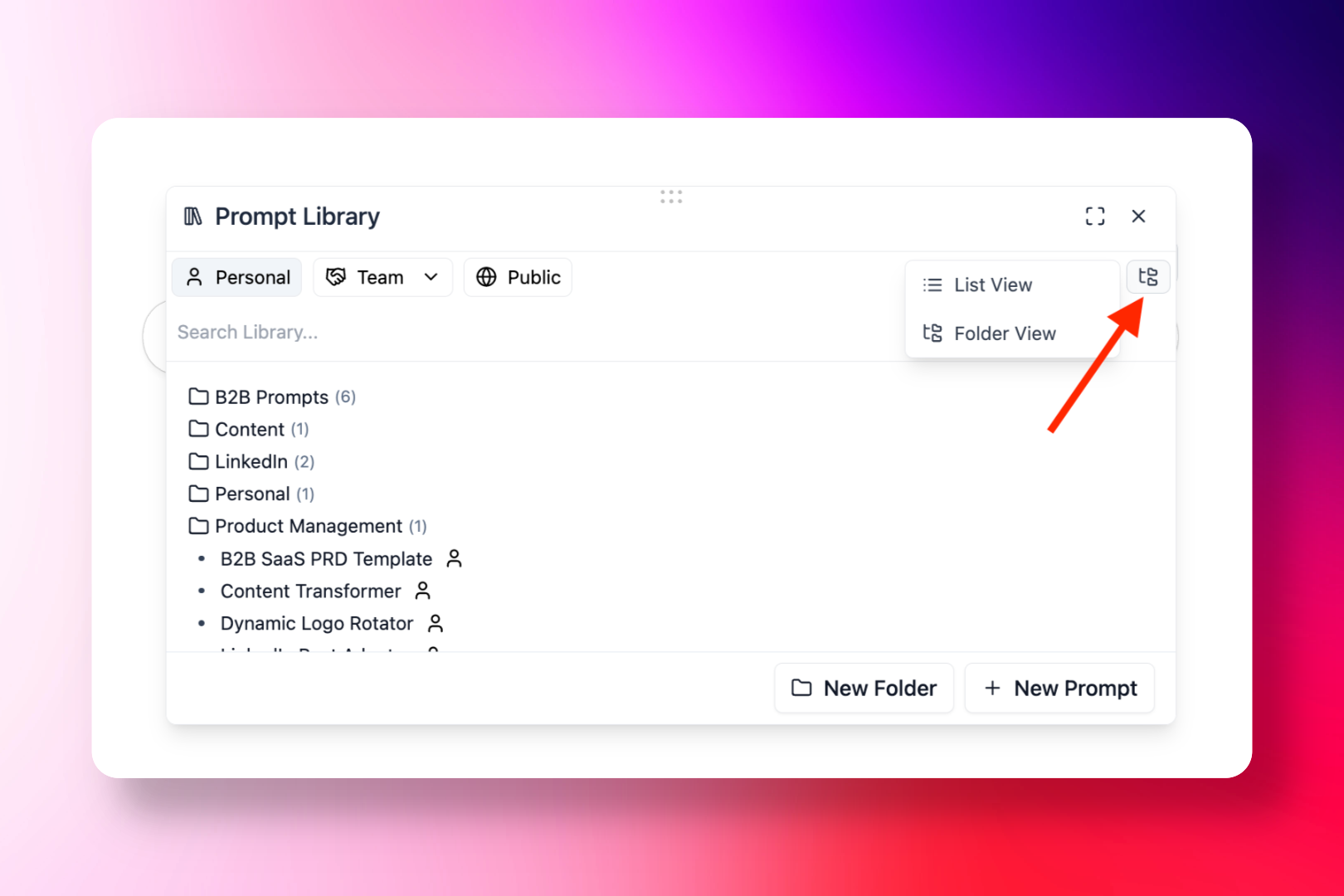
5 updates focused on improving the Prompt History, Library Folders, and Filters in the Extension.
✨ New
Prompt Folders in the Extension
- Access the same UI from the Library Folders in the Web App, directly inside the Extension.
Maximize Floating Form Window
- Expand the Floating Form to a full window for easier reviewing of prompts.
🎉 Improvements
Prompt History Labels + Icons
- Prompt history now displays type labels and icons for clarity.
Improved vs. Refined Visibility
- Easily distinguish whether a prompt was Improved or Refined.
Prompt Type Filter in History
- Filter your history by prompt type: Improved or Refined.
November 24, 2025
New Floating Button
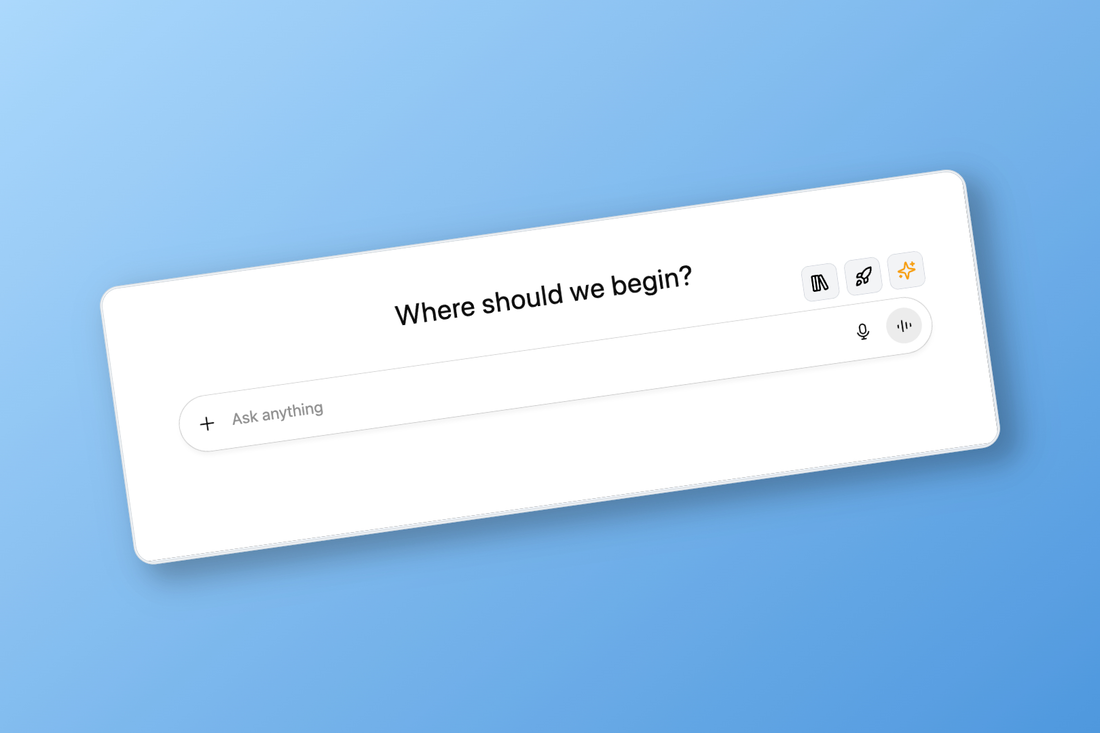
After trying many different button combinations, we settled on a simple UI, less intrusive and focused on Improve Prompt - Refine Prompt - Access Library.
✨ New
New Floating Buttons
- Once logged into Pretty Prompt, you'll notice a new set of floating buttons, replacing the old "✨Improve Prompt" button animation and dropdown
- Main button: ✨ Improve Prompt
- Secondary buttons: 🚀 Refine Prompt and 📚 Access Library
- Functionality remains the same: hover over the button to open the 3 options, or use the hotkey "Tab" to trigger Improve Prompt
- The rest of the functionality is accessible from the extension popup.
November 21, 2025
6 New Quality of Life features
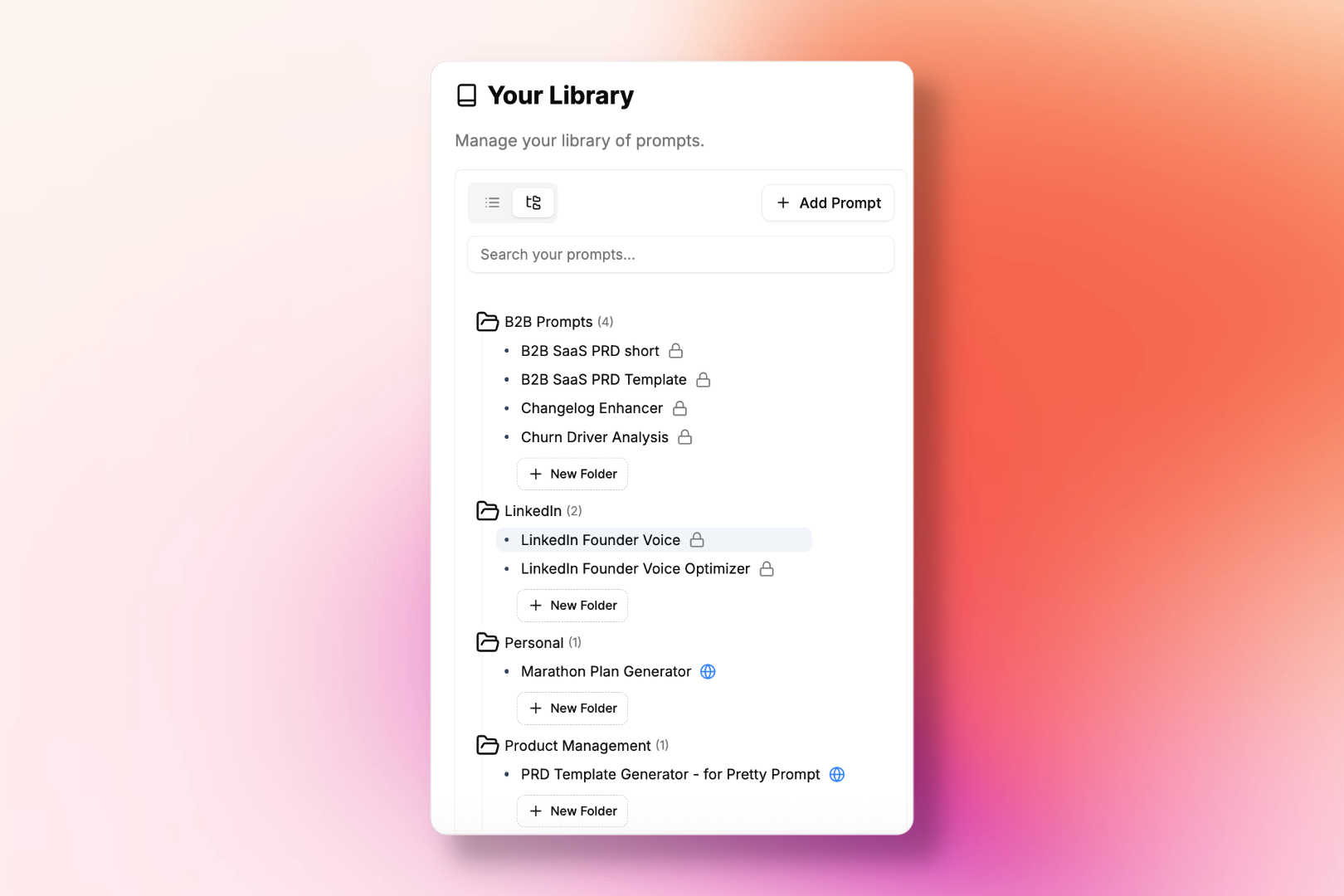
We've released 6 features based on your feedback for better usability and Quality of Life. This update includes improvements to the Extension Popup, Web App, and new login capabilities.
✨ New
Prompt Library Folders
- Organize and save prompts into folders for better prompt management. See video here →
- Please note this is a Pro feature, available on the Web App (coming to the Extension soon.)
Sign in with Email + Password
- Log in using a standard email and password workflow. Read more here →
- Use Google OAuth, and/or email and password.
Remove Prompts from History
- You can delete prompts from your history on both the Popup and the Web App.
🎉 Improvements
Refine Functionality in the Popup
- Refine prompts directly from the browser popup. (Hint: use hotkeys 'Cmd + Shift + P' to open the popup on any website)
- See video here →
Library in the Popup
- Browse and manage your saved prompts without leaving the popup.
- Click the 3 dots → Library
Library on Web App
- Access and manage your Prompt Library from the Web App.
November 17, 2025
Pretty Prompt for Perplexity
You can use the Pretty Prompt Extension right inside Perplexity to Improve/Refine your prompts without leaving the window. Type your Prompt in Perplexity → Hit 'Tab' → Done.
✨ New
Pretty Prompt for Perplexity
- We're expanding beyond ChatGPT, Gemini, and Claude.
- You can now select which additional sites you want Pretty Prompt to work on. Perplexity is first in the list! See Demo Video.
- How to activate it?
- Go to the Pretty Prompt Web App
- Click Sites
- Enable Perplexity (only need to do this once). Once enabled, you can use Pretty Prompt every time you're in Perplexity. No other setup needed.
October 16, 2025
Pretty Prompt on Comet
Pretty Prompt is now available on Perplexity's Comet. Refine and improve your prompts directly inside Comet. Works right out of the box just like Chrome.
✨ New
Prompt Library now Available on the Web App
- Add new prompts (import from Notion, spreadsheets, docs, etc.)
- Edit or modify saved prompts.
- Delete prompts from your Library
🎉 Improvements
Refine tab hotkeys
- We've added hotkeys to the Refine tab for faster navigation.
Reset Prompt on Tab Switch
- Switching tabs now clears the previous prompt automatically for a smoother workflow. Improving the same prompt twice no longer consumes additional credits..
October 16, 2025
Six New Extension Features
Major update to the Pretty Prompt Chrome Extension with six exciting new features to improve your workflow.
✨ New
Six new updates to the Pretty Prompt Chrome Extension
- Open the Prompt History from the Extension Popup - Access your prompt history directly from the extension.
- Save prompts from your History to the Library - Easy-access of your favorite prompts across LLMs.
- Update / Delete saved prompts in your Library - Manage your saved prompts effortlessly and bring prompts from outside Pretty Prompt to your Library.
🎉 Improvements
Search bar on the Prompt History and Prompt Library
- Quickly find the prompts you're looking for with the new search functionality.
Navigate to the Web App from the Extension
- Click the Home button 🏠 to easily navigate to the Web App from the Extension popup.
Pinned button on Claude
- You can now enjoy the
✨ Improve Promptbutton "Pinned" on Claude, ChatGPT, and Gemini.
- You can now enjoy the
October 9, 2025
Pretty Hotkeys & Original vs Improved
Introducing keyboard shortcuts and the ability to toggle between original and improved prompts.
✨ New
Pretty Hotkeys ⌨️
- We're introducing Hotkeys for Pretty Prompt. Same functionality, better usability.
Hotkeys include:
-
Tab→ Improve your prompt -Cmd Enter→ Apply it -Cmd Shift P→ Open the Extension popup from any website
- We're introducing Hotkeys for Pretty Prompt. Same functionality, better usability.
Hotkeys include:
-
Original vs. Improved Prompt
- You can toggle between your Original Prompt and the Improved one without ever leaving the form. Think of it like Granola's Notes vs Enhanced Notes. A quick, side-by-side peek.
🎉 Improvements
Block Functionality on Prompts with Context
- When improving a follow up prompt, it will now be presented in Blocks in the same way it's done with the first prompt of your chat. Edit functionality and broken down into sections.
🐛 Fixes
Prompt Format is respected when applied on ChatGPT
- We've added line breaks for easier readability.
September 14, 2025
Pretty Prompt Web App Release
Pretty Prompt just got even more flexible. You can now use it as a Web App, in addition to the Chrome Extension.
✨ New
Introducing Pretty Prompt Web App 🧑💻
- Pretty Prompt just got even more flexible. You can now use it as a Web App, in addition to the Chrome Extension.
- Access it from any browser, no Chrome Extension required.
- Same Account & Engine – Log in with the same email you used for the Chrome Extension; all your improvements and prompt history stay synced.
- Prompt History – Access all your past prompts anytime, across devices. Easy to Use – Paste or type a prompt, click Improve Prompt (⌘ + Enter), refine, copy, and review — all in one place.
- If you've been limited by browser restrictions, IT policies, or just prefer a Web App, this one's for you. How It Works:
- Go to app.pretty-prompt.com (or click "Log In" on the landing page).
- Paste or type your prompt. -3. Click Improve Prompt (hint: ⌘ + Enter). -4. Refine, copy, and access your history from one place. Tip: It's mobile friendly 📱. See the blog post here.
🎉 Improvements
Improved Extension Popup UI to add a Copy to Clipboard button
🐛 Fixes
Fixed the positioning of the ✨ Improve Prompt button
- Fixed the positioning of the
✨ Improve Promptbutton so when you click on the input text in ChatGPT, Gemini, or Claude, the button appears even if you haven't typed anything yet.
- Fixed the positioning of the
September 4, 2025
Prompt Blocks & Conversational Memory
Major update introducing Prompt Blocks for structured prompts, Key User Input respect, and Conversational Memory.
✨ New
Prompt Blocks 🧱
- Prompt Sections – Prompts are broken into block sections for easier review. Edit Inline – Click a block, edit, and it auto-saves. Explanation – Hover on the tooltip to see exactly what's been improved. Why it matters: -Makes prompts transparent and structured. -Helps you learn how to write better prompts. -Saves time on reviewing and improving prompts.
Key User Input Respected
- Paste any key information or reference you want to user in your prompt between quotes (" ") and Pretty Prompt automatically adds it to the improved prompt. See the key info reflected inside the Key User Input block. Improvements now respect your key inputs for better results. This is particularly important when you need your prompt to keep specific information such as a URL, a guidance post, a job description, or any other important input for your improved prompt. Why it matters: -Ensures critical info is respected in your improved prompts. -Improves output quality.
Conversational Memory 🧠
- Until now, Pretty Prompt treated every prompt as brand new. That worked fine for fresh chats — but once you were in the middle of a conversation, follow-ups felt like starting from scratch. Not anymore. Conversational Memory uses your past messages in the same chat when you hit "Improve Prompt." This keeps your follow-ups relevant, connected to the flow of thought, and in-context with what you've already written. 💡 Think of it like RAM for your prompts: temporary, smart, and always improving your next prompt without extra work.
🎉 Improvements
Prompt History Improvements
- Prompt History Faster loading
- Prompt History available for Free tier users. Limited to last 3 prompts only → You can access your whole prompt history on the Pro plan.
- Updated icons on Prompt History. You will now see the icon of the platform where the prompt was improved originally (ChatGPT, Gemini, Claude, or Pretty Prompt if you've used the extension popover.)
- Search functionality in Prompt History (for Pro plan users only).
Click on the textbox in ChatGPT → ✨ Improve Prompt button appears
- We improved the usability of the ✨ Improve Prompt button by making sure it always appear when you click on the textbox, in addition to when you're typing.
🐛 Fixes
Fixed Pinned button positioning
- We've fixed the Pinned button to show just above the textbox for ChatGPT and Gemini.
August 15, 2025
Prompt History Feature
Never lose a prompt again with the new Prompt History feature.
✨ New
Prompt History
- Never lose a prompt again.
- We've added Prompt History, so every prompt you run through Pretty Prompt — both the original and improved versions — is now automatically saved and easy to access across platforms.
Why this matters:
-Accidentally deleted a prompt? You can grab it back in seconds.
-Wrote something in ChatGPT but want to try it in Claude (or anywhere else)? Now you can.
(If you use Raycast, it's like your Clipboard history, but for prompts.)
Now your prompts go wherever you do, across platforms.
How to use it?
-Click on the dropdown next to the
✨ Improve Promptbutton. -Click onPrompt History. -Browse your past prompts, copy the one you want, and paste it anywhere.
Key User Input is respected
- If you add to the prompt anything specific like a quote, reference, template, or a post to be taken into account, Pretty Prompt will now respect it and include it in the improved prompt output. It may seem like a small change, but it has a big impact on the quality of the improved prompt. This means improved prompts will be more specific, nuanced, and reference any key information you've added, to get better results.
🐛 Fixes
Fixed Gemini and Claude UI errors on floating button
August 4, 2025
Shorten Button & UI Improvements
Added Shorten button for more concise prompts and improved the floating form layout.
✨ New
Shorten Button
- We've added a Shorten button when improving prompts, so you can now choose between the default improved prompt and a more concise version (Shorten button).
- This came out of user feedback, people felt that some improved prompts were a bit too detailed for simpler use cases. Others wanted more control over how in-depth the response should be. So we built a new option that lets you
Shortenthe improved prompt when you want something quicker or more to the point. - Now, Pretty Prompt gives you two versions to choose from
ShortenorExtend, depending on what the situation calls for.
🎉 Improvements
Updated the floating form layout to improve usability and overall feel.
- The top menu of the floating form is sticky, so you can always see it and interact with it. And we've added a bottom border to the floating form also sticky with the top menu.
🐛 Fixes
Fixed token error issue that some users were experiencing.
Fixed UI of dropdown arrow on ✨ Improve Prompt button.
- This was happening when the button was pinned and you would paste text into the input field. This is now fixed.
July 30, 2025
Free Tier Improvements & Fixes
Improved free tier reset timing and fixed various formatting issues.
🎉 Improvements
Free tier reset now based on your timezone
- Free prompts now reset daily at midnight in your local timezone, instead of 24 hours after hitting the limit.
- This makes it clearer when your 3 free prompts refresh.
- You can use Pretty Prompt for free as long as you like, or go Pro for unlimited prompts and full access.
🐛 Fixes
Fixed prompt form cut off on smaller screens
- This issue has been fixed, where the prompt form would get cut off on smaller screens.
Fixed formatting issues with Claude
- Improved prompts now properly retain markdown and structure when applied.
July 21, 2025
Pin or Float Button
Rebuilt the Improve Prompt button so you can choose where it appears and how you interact with it.
✨ New
Pin or Float the ✨ Improve Prompt Button
- We heard your feedback and rebuilt the
✨ Improve Promptbutton so that you can choose where it appears and how you interact with it. - Select between:
- ☁️ Float Button: Follows your typing.
-📌 Pin Button: Stays fixed on the page.
How to change the position:
-Click the dropdown on the
✨ Improve Promptbutton. -Or go to Settings in the extension popover (top-right corner of Chrome). Behavior: - Default is Floating – Below Text.
- Pinned opens automatically when you start typing, and hides when the input is empty.
- Floating tracks your cursor across the input field.
- We heard your feedback and rebuilt the
July 15, 2025
Extension Popover & Reviews
Improve prompts from anywhere on the web and showcase user feedback.
✨ New
Improve your prompts from anywhere (Popover)
- You can now improve your prompt from anywhere on the web by opening the Popover (extension app) on your Chrome, and typing right there.
- The idea is to give you the flexibility to improve prompts to get better AI results wherever is best for you to do so.
- Sometimes is best to use the native app on the LLM platform (e.g. ChatGPT, Gemini, Claude), sometimes you can open the extension app, and improve the prompt there, copy it, and paste it anywhere it needs to be.
Reviews section & Wall of Love
- We are big on user feedback. And want to showcase how much love users have been sharing for Pretty Prompt. With more than 5,000 users, and dozens of reviews, we've built a new Reviews section on the website, so you can enjoy what others say about it.
July 11, 2025
Prompt Library
Save your favorite prompts and reuse them later with the new Prompt Library.
✨ New
Prompt Library
- Say you found a great prompt. Gives you exactly what you want out of AI. But then you need to save it on a spreadsheet, or document… And have it handy, to reuse. It's annoying… Pretty's Prompt Library solves that.
- Save your favorite prompts. Reuse them later.
- This feature is available for Pro users only.
- Once you find a great prompt. Save it on Pretty, and just use it again and again.
- The best part of it: Pretty creates a name for it, and gives you a simple search to find the prompt you need when you need it.
How to save prompts?
-Type as usual
-Click
✨ Improve Prompt-Once the prompt is improved, click💾 Save PromptHow to reuse prompts? -Click on the dropdown button next to✨ Improve Prompt-Click on📚 Prompt Library-Reuse any of your saved prompts
New Floating button with dropdown options
- This allows you to access the Prompt Library and Snooze the app from the same floating button.
🎉 Improvements
Copy button
- You can now copy the improved prompt to your clipboard.
July 8, 2025
UI Improvements
Enhanced drag functionality and updated free tier limits.
🎉 Improvements
New Draggable icon
- A new draggable icon has been added to emphasize the Drag and Drop functionality of the floating box.
New daily limit for Free users
- We've updated this to 3 improved prompts per day based on user feedback.
July 7, 2025
Multi-language Support
Expanded Chrome listing to support multiple languages.
✨ New
Expanded Chrome listing to other languages
- Now available in: English, Arabic, French, Japanese, Korean, Russian, Spanish. See the full list here.
July 4, 2025
Claude Support & Major Features
Added Claude integration, native language support, drag & drop, and snooze functionality.
✨ New
Native language
- If you ask something in your native language, we'll return it to you in the same language. With AI being used around the globe, there are so many different types of users and preferences. We want to ensure that we can keep the experience flexible to those needs. In this release, we're bringing in features that will make the experience more personal and magical.
Claude
- Introducing Pretty Prompt for Claude With this update, Pretty now works with Claude, alongside ChatGPT and Gemini. No extra setup needed. Just open Pretty, select Claude, and get to work.
Drag & Drop
- With Drag & Drop, you can now move the Pretty Prompt optimization window wherever you'd like on your screen. Here's how it works: -Click on the floating window -Drag it to where you want it to be
Snooze Button
- We understand that while Pretty can always help you get the best prompts, there may be times when you want control over the app being present on your screen. With Snooze, you can now choose to temporarily hide the app and reactivate it again at any time directly in your flow of work.
🎉 Improvements
Prompt Speed improved ~50% faster
Character limit has been increased from 2000 to 5000.
- We found that many users were creating large prompts that went beyond our 2000 character improvement limit. So we increased it. More characters, means more flexibility in what you can prompt, and better results for you.
UI Improvements
- The UI is tighter and cleaner, making the experience feel more crisp.
Copy and paste text now triggers the "Improve Prompt" button.
- Before this update, you'd have to start typing to get the button to show, now you can paste your text and it will trigger the button to appear automatically.
🐛 Fixes
Sign in / Out no longer causes page to refresh
- Creating a smoother experience.
June 17, 2025
Framework Refactor
Major codebase refactoring for better scalability.
✨ New
New Framework
- We've refactored the whole codebase to make it a lot easier to make changes as we scale.
🐛 Fixes
Gemini formatting issues
- Fixes Gemini issue where refinement would clear the prompt text-box.
- Fixes issues that users were reporting about the floating button not appearing.
- Fixes issue of the floating form rendering halfway off the page so you couldn't click Apply.
June 11, 2025
Gemini Support
Expanded Pretty Prompt support to Gemini and Google AI Studio.
✨ New
Gemini
- With the release of Pretty Prompt for ChatGPT on May 31st, 2025, we began the journey of making better AI results accessible to everyone.
But that doesn't happen on just one LLM: You can now use Pretty Prompt on Gemini and Google AI Studio, in addition to ChatGPT.
How it works:
-Open the LLM platform
-Start typing your prompt
-Click on
✨ Improve Promptwhenever you're ready. Gemini and Google AI Studio are available to all Free and Pro plans and includes full prompt pre-optimization and prompt refinement for all users.
- With the release of Pretty Prompt for ChatGPT on May 31st, 2025, we began the journey of making better AI results accessible to everyone.
But that doesn't happen on just one LLM: You can now use Pretty Prompt on Gemini and Google AI Studio, in addition to ChatGPT.
How it works:
-Open the LLM platform
-Start typing your prompt
-Click on
🎉 Improvements
Error Messaging
Better error messaging when prompts goes over the character limit.
Help Center
Contact Support
Request a Feature
What's New?
Blog
Reviews