Guide
How to fix a prompt that isn't working
Fix weak prompts in ChatGPT, Claude and Gemini—diagnose what's wrong, rewrite for role, task and format, then test again. A practical prompt improver workflow.
By Ilai SzpiezakUpdated 5 min read
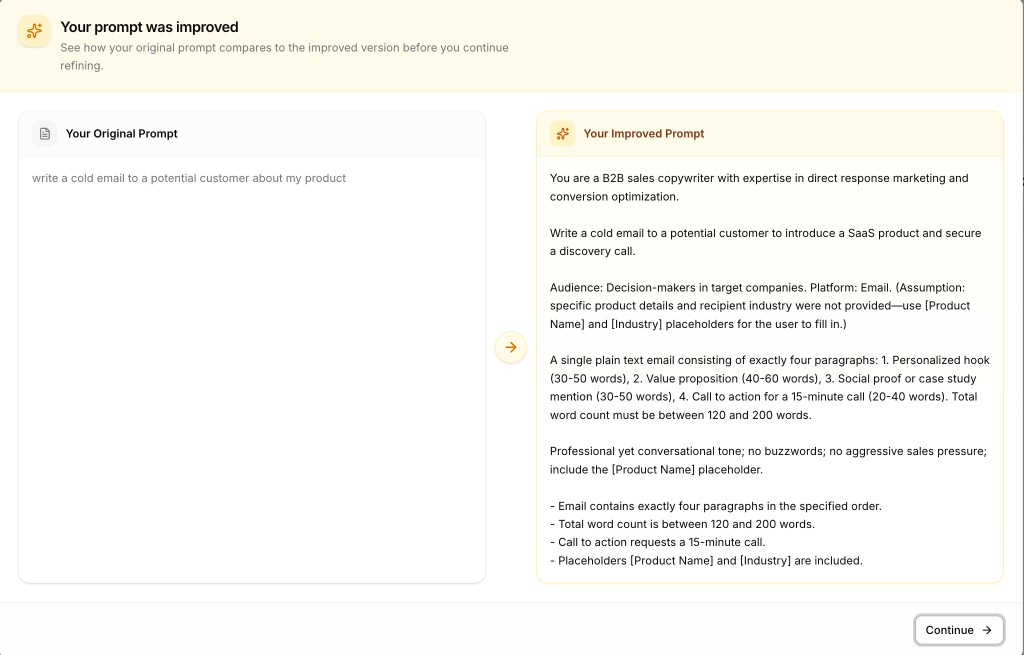
How do you fix a prompt that is not giving you the right answers? How do you help an LLM understand what you are writing? How can you do this consistently to get better results from AI? These are all valid questions.
I've helped plenty of people prompt better, and get much better results from AI, so I hope this will also help you on your prompting journey.
When a prompt "fails", the model isn't being difficult—it's usually due to working with incomplete instructions or context.
A quick way to fix it is by naming the role, task, context, and output format in plain language, then run one short test. To clarify, I do this dozens of times a week in ChatGPT before I send anything serious off to work for an agent.
I usually put ChatGPT and Claude side by side to test my ask simultaneously. (A nice trick that saves a lot of time later.) So how do you actually fix a prompt in simple terms? Answer below 👇
(See also: Improve Prompt in the web app and your first improved prompt in the docs.)
Before you start
- Have the original prompt and one example of the bad output in front of you.
- Pick one model for the first test (ChatGPT, Claude, or Gemini). Don't tune across three tools at once.
- Know which job or task you're asking AI to do for you: writing, analysis, code, vibe coding, planning, research, etc. The fix is similar, but examples differ.
- Open the AI where you normally work. If you use Pretty Prompt, you should see the extension button near the message box on supported sites.
Step 1: Name what went wrong
Read the answer and make a note on what is wrong or vague:
You can make these notes on Notion, Notes, or a simple doc. Write bullet points on each element that is wrong. For example:
- Too vague — filler text, no specifics.
- Wrong format — essay when you wanted bullets as an output, or something different.
- Wrong tone — too formal, too casual, salesy, etc. If you want it to be "more like you" make sure you copy and paste also a few examples of what you've written, so that the AI can use them as guidance to copy your style.
- Missing constraints — length, audience, language, or things to avoid.
Write one line: "The output failed because …" That line becomes the Task fix in the next step.
Step 2: Rewrite with Role, Task, Context, Format
Paste this skeleton above your old prompt and fill in the blanks:
Role: You are a [job title / expert] helping a [audience].
Task: [One specific deliverable, verb first.]
Context: [Facts, links, paste text, or "use the attachment".]
Format: [Length + structure — bullets, table, JSON, etc.]
Constraints: [What to avoid. Optional but useful.]
Before (broken):
summarise this article for me
After (fixed):
Role: You are a newsletter editor writing for busy founders.
Task: Summarise the article below in 5 bullet points.
Context: [paste article]
Format: Each bullet = one insight + why it matters; max 12 words per bullet.
Constraints: No hype words; British spelling.
Step 3: Test in ChatGPT, Claude or Gemini
ChatGPT
- Paste the new structured prompt with your notes into the message box.
- If the answer is still "off", add one example under Context: "A good output looks like: …" or "I like this other article/writing from ..."
- If you send a follow-up prompt in the same thread, don't just keep sending vague "try again" replies in the chat. Think of it as a pyramid, every new message needs to add more relevant information to the conversation. You can also always edit the last message if needed.
Pretty Prompt uses the whole conversation when you improve a follow-up prompt, not just that one line1.
Claude
- Use clear section headers (
Role,Task,Format)—Claude treats them as binding. Anthropic's overview covers role separation and worked examples in more depth.2 - If you hit length limits, split Task into "Part 1" and "Part 2" rather than one giant paragraph.
- Attach files when Context matters; say "use only the attachment" if you want to block web search. Or add URLs, screenshots, and documents for full context gathering.
Gemini
- State Format explicitly (tables and short lists work well).
- Attach images or Docs when Context isn't in the text box. Gemini can connect with your Google Drive, so it helps reading the source files.
- If you switch between reasoning and fast modes, retest once before moving—behaviour can shift slightly between modes3.
Step 4: Add one example if output is still off
AI models mirror patterns. This means adding a single mini example of the shape you want can help direct the model in the direction you want:
Example output (follow this structure):
- Insight: …
- Why it matters: …
Don't paste ten examples unless you're few-shotting on purpose—that often bloats the context without helping. We want to keep the AI as narrow as possible in the "universe" we're working on. Help the LLM predict the right next token for your own use case.
Step 5: Save what worked
When a prompt finally behaves the way you want it to, store it:
- On Pretty Prompt: open the Prompt Library from the extension and save the version that worked—or reuse saving prompts from the docs.
- No tool: keep a personal note with the skeleton + your best filled-in version.
Next time you get that "fix my prompt" déjà vu, you start from the saved version, not from scratch. Having a central prompt library really helps, especially when you can pull these prompt across any LLM and model (like with Pretty Prompt!)
Rules of thumb
- One prompt = one deliverable. "And also analyse and design a logo" creates mush. Keep the tasks concise and clear.
- Put must-have constraints in Format or Constraints, not buried in paragraph 7.
- If you say "be concise", give a number (words, bullets, minutes).
- Use British spelling in the prompt if you want British spelling in the answer.
- When a chat goes sideways, a new thread with one consolidated prompt beats ten follow-ups. LLMs have context windows, which means the more rubbish you put in a chat, the harder it gets for the LLM to focus on what you truly mean.
Doing it in one click
Pretty Prompt doesn't replace the thinking in Steps 1–2—you still decide what's wrong and what "good" looks like. It does speed up the rewrite:
- Type or paste your rough prompt in a supported chat.
- Click Improve on the Pretty Prompt button.
- Choose Improved (closer to your words) or Refined (for more structure and constraints).
- Send the version you picked.
You skip manually rebuilding Role/Task/Format each time. It won't pick your strategy for you, and it won't fix a prompt that has no clear goal—that's still Step 1.
But it will help you improve a prompt that's vague, and therefore produce better results from the LLM. Like Grammarly does for grammar, Pretty Prompt does for prompting.
Sources
Footnotes
-
OpenAI, "Prompt engineering," https://platform.openai.com/docs/guides/prompt-engineering (checked 23 November 2026). ↩
-
Anthropic, "Prompt engineering overview," https://docs.anthropic.com/en/docs/build-with-claude/prompt-engineering/overview (checked 23 November 2026). ↩
-
Google, "Prompt design strategies," https://ai.google.dev/gemini-api/docs/prompting-strategies (checked 23 November 2026). ↩